Browse   Newsletters   Contests   Ask   Share   Account   About

Organizing and Remembering Usernames and Passwords

Computer login window.Many of us have online accounts that require usernames and passwords. If you use multiple ones for different accounts it can be difficult to keep track of them. This is a guide about organizing and remembering usernames and passwords.
     

Solutions: Organizing and Remembering Usernames and Passwords

Read and rate the best solutions below by giving them a "thumbs up".

Email Account for Passwords

It's hard to remember all of those passwords for different sites, and writing them all down isn't safe, so how do you keep up with them all? Start a separate free email account (yahoo, hotmail, gmail, etc) just to keep up with those passwords. Email them to yourself at that account, with the name of the site as the subject. Then you can look them up anytime you need them quickly and easily!

By Bailegirl from NC

11 0SharePrintFollow6 Feedbacks

Mnemonic For Password

I remember sentences to create passwords for my computer. For example, I may think, "I Love My dog so much" so my password would be "ILMDSM"

I = I
Love = L
My = M
Dog = D
So = S
Much = M

It's a very easy way for me to remember my password.

By Caroleerose from Madison, AL

8 0SharePrintFollow3 Feedbacks

Remember Three Words For Passwords

I have given this lots of thought and have figured out a simple way to have a unique password for every site I visit with only needing to remember 3 words.

I have a word for sites that deal directly with my money, for example my bank account and Paypal. I have a word for dealing with web accounts where I spend money, like eBay and Amazon. And I have a word for all the generic websites I visit like ThriftyFun.

Pick a common word you can remember and geekify it. For example the name Mike could easily be spelled m!K3 using the exclamation point as an upside down "i" and the number 3 for a reversed E. The option of reversing case is up to you, the name Mike could just have easily been M!k3.

Now, take the name of the website you are visiting and take at least 2 letters from the website name. In the case of ThriftyFun you can take TF and add it to the end of your word. So if we are using Mike, our password would at this point be m!K3TF. However, that is only 6 characters and most websites prefer a longer password, so I add one number for each letter of the website I used. So my password for ThriftyFun would be m!K3TF12.

If I was making a password for Amazon my preference might be the first and last letter for a one word website. But my preference is actually to use the vowels of the site name. So my unique password for Amazon would be m!K3aAO123. So my general websites' passwords for these sites would be:
Amazon m!K3aAO123
eBay m!K3ea12
Office Max m!K3om12

My bank is Home Federal I use a different method for it because it is direct access to my money. I use the whole name, but I substitute all vowels with numbers, the first vowel is 1 the second 2 etc. h1M2f3D4R5L. I could have used the same method as before with a different word like the word mantis M@NT!5 with the letters of the bank hf and the number 12 so the whole password would be M@NT!5hf12.

And my third password is in the same vein, I just made it unique so it is used less often. It takes a minute to think about your password, but you have a unique password for every site and you have your method of remembering what your passwords are.

Source: IT professional dealing with people writing their passwords on sticky notes and putting them on their computer in plain site. :/

By Suntydt from Tazewell, TN

7 0SharePrintFollowPost Feedback

Easy to Remember Password

Not necessarily a "thrifty" tip, but a time and trouble saving one. If you're in need of a security code word or password, you can use a phone number of a friend or family member that's ingrained in your long-term memory, along with their initials. If you're likely to need a reminder, simply tape their name, or relationship (i.e. "Grandma") near your computer.

By Doggy

4 0SharePrintFollowPost Feedback

Password Protection

Write new passwords in an address book to remember them.I have a unique way for remembering my passwords. I came up with a simple sentence that I can remember, for instance:"I love hot fudge sundaes and chocolate cake 2 !" My actual password would be: ilhfs&cc2!
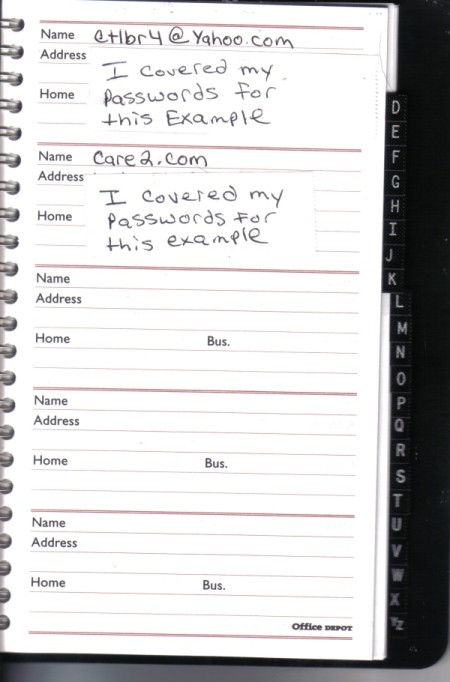
I also use a telephone book to store all my passwords and I write them in pencil so I can easily erase and rewrite new passwords every 45 days.

You can now use @ # $ % ^ & * ( ) ? > < ! as part of your password.

My passwords are now very complex and there's no way I remember any of them. If nothing else, it keeps my sanity.

By CaroleeRose from Madison, AL

4 0SharePrintFollow1 Feedback

Recording Email Addresses and Passwords

I have found that it is best to keep a hard copy of my e-mail address book and user names and passwords, just in case of computer loss or my memory failure. I use a 3 by 5 inch spiral notecard book. At the front, I have my information for my personal email accounts. Then I mark pages through the alphabet with 2 or 3 pages for each letter. On these, I record my friends' and family's names and emails. I also record the sites I go to and my user name and password for each site. Towards the back, I have my information for all the bills I pay on-line.

This has been a real help to me in the past when I had a computer crash or changed computers. I take my notebook with me if I need to go to the library to use one of their computers.

By Nightsong from Yates Center, KS

4 0SharePrintFollow1 Feedback

Easy to Remember Passwords

I don't use many different screennames to keep it simple, but here is how I remember my passwords. I write them down, and carry most in my wallet, but I disguise them with words and numbers that only I would know or understand (or my family would either know or could find out, in case of my demise and they would want to get into my bank account).

For example: my password might be: littlest niece's middle name, year mom died, and name of my first cat) = Lindsey2001Kitty. Or another: color of my car, year I started this job, and my best friend's last name = red2010angela. You get the idea.

By Vicki from Dallas, TX

3 0SharePrintFollow1 Feedback

Keeping Track of Logins, Websites and Phone Numbers

I use a spiral notebook to keep tips, website addresses or phone numbers for companies I might use at gift buying time by the computer. I also write my passwords for different logins on the back cover. It is quick and I don't need to memorize all the different logins.
2 0SharePrintFollow7 Feedbacks

Memorizing Site Passwords

If you have a computer program that remembers all of your passwords for you for all of the websites you visit, you can get very dependent on that for serving as your "memory". If your system were to fail, you would probably be hard pressed to remember all of your passwords. Instead of writing the passwords down, which is really not very secure, every time you visit a favorite website, THINK the password as a way to test your own memory and keep those passwords fresh in your mind.

By ginnywest from Murrells Inlet, SC

2 2SharePrintFollow2 Feedbacks

Logins, Passwords and Security Questions

I use my computer constantly and have for many years. Along the way, I've joined many, many sites, forums, etc. with user names and passwords. I use the same for most, but there are those that require something a little different and mine won't work. There are also security questions at times, too, and being from a legal field for many years, I tend to think of the future and what would happen if someone needed to access my info.

I keep a long 4 inch x 6 inch file card box with each of those places on a card. I include the web site address, my user name, password, security question, answer, the email address I used, etc. It helps me a lot, since I'm never sure if I've signed up for an account on a site I haven't used in a long while. Friends have adopted this idea, too, after trying notebooks and other list keepers.
1 0SharePrintFollow4 Feedbacks

Remembering Usernames and Passwords

It is hard to remember passwords. When possible (when you are able to select your password), choose a very short word that is easy to remember + a few numbers. For websites, put those numbers within the word. Most websites require 4-6 numbers and/or digits. Then when you go to a website that you have not used in a while you will know about what password you used.

For instance take the short word zip + (4 random numbers) you could do something like z45i11p (zip + 5411). I even use this plan with my debit cards and all. The ones that require you to change on a set basis then reorganize the numbers.

By notwrong

0 0SharePrintFollow2 Feedbacks

File Your Computer Passwords

Since an assortment of creative passwords and other info is too much to remember when accessing your favorite websites, you might find the following tip useful:

I write the website name on a file card with the user name I'm identified under along with the password and any pertinent information relating to it (secret question and answer, support number, etc). All cards are filed in alphabetical order and hidden from anyone who shouldn't have access to the file box. Also, Yahoo now has OpenID so you don't have to remember but one password to gain access to a list of sites.
0 0SharePrintFollow10 Feedbacks

Keep Online Passwords Locked Up

I keep my most visited web sites with user id's and passwords written down on a little notebook and locked in a safe. Before I get online, I reference back to the ones I want to visit, then return the notebook back to the safe. If I happen to write down any information, I crosscut shred when finished.
0 0SharePrintFollow1 Feedback
Share Your Feedback: Once you try any of the above solutions, be sure to come back and give a "thumbs up" to the solution that worked the best for you. Do you have a better solution? Click "Share a Solution" above!

Questions

Do you have a question related to this page?

Archives

Here are archived discussions related to this page.

Remembering Usernames and Passwords

To keep track of all my internet usernames and passwords for banking, bills etc. I just typed them all in catagories of: site, username, password then printed them out and taped them inside my computer cabinet door. No more forgetting. No one ever uses my computer so if privacy would be an issue, just hide it nearby your computer.

By Melanie


RE: Remembering Usernames and Passwords

I do the same thing plus I enter them into Excel and save to disc and to be sure a cd, it only takes a minute to load, change and save info. (12/04/2004)

By tootsy118

RE: Remembering Usernames and Passwords

I use a flat Rolodex for mine, with the lettered tab spacers. I write each website and user id and password and file them under the appropriate lettered tab in alphabetical order. Saved a lot of searching through little pieces of paper that I use to keep on the work station. Now it's all in one. I like the flat Rolodex better. Got it from work when I retired. And since I am the only one in my house, privacy is not an issue. (so far). LI Roe (12/05/2004)

By LI Roe

RE: Remembering Usernames and Passwords

I use a simple address book. I got a small 4x6 book with the alphabet tabs and keep it in my desk. I have referred to it many times. (12/05/2004)

By nosurrender

RE: Remembering Usernames and Passwords

Where privacy is an issue, I write my passwords, PIN numbers, etc. down disguised as phone numbers, zip codes, or something of the sort. If someone was digging through my papers and found a list of phone numbers (with bogus names before them) I doubt if they'd suspect they were anything but phone numbers. For example, if I had a PIN number of 9999 (I don't, BTW), I might write it as "987-9999". If it were the number for my account at the Trust Company Bank (I don't have one of those either) I might precede it with a name like "Tom's Country Biscuits".

Just a few thoughts on the subject... - Alph (12/08/2004)

By Alph

Remembering Computer Passwords

I bought a blank book, and put all the different websites and addresses, passwords, user names in it - this way it can be on the book shelf and no one knows its there (except my husband who always forgets his passwords). I usually pay bills online but I needed to have something where he could go if he had to pay them some day.

By Mary (12/10/2004)

RE: Remembering Usernames and Passwords

those of you living alone who think privacy isn't an issue......what if someone broke into your home? they would be able to find where you list those items easily. Alph has the right idea! also tootsy118. you can save them on a cd and label the cd something like Dolly Parton's Greatest Hits, something no burglar would suspect had important password info on it. (12/11/2004)

By lannwashburn

RE: Remembering Usernames and Passwords

I KEEP ALL USERNAMES AND PASSWORDS IN A WORD PROCESSING FILE. THIS WAY IT IS ALPHABETIZED, EASY TO SORT AND EASY TO ADD, DELETE AND FIND IT WHENEVER I NEED IT. YOU CAN KEEP PIN NUMBERS, ACCOUNT NUMBERS AND PASSWORDS ALL IN THE SAME PLACE - EASY! (12/20/2004)

By INKSPOT333

RE: Remembering Usernames and Passwords

I use a handheld. With it, you can backup the info into your computer. You can also deny access to other people by saving it with a password of its own. And, it's easily portable. (02/14/2005)

By Wanda

Usernames and Passwords For Websites

I use 3x5 index cards to write email addresses and favorite websites as well as keeping my username and password on these cards if I happen to forget when I use more than one username for different websites.

By mzkeller (03/30/2005)

RE: Remembering Usernames and Passwords

I use one of those small, free address books that you get every year when you get calendars. (03/31/2005)

By wallflower

RE: Remembering Usernames and Passwords

I use this handy book called "My Computer Log." You can read about it at www.mycomputerlog.com. (01/12/2006)

By asappub


Remembering Usernames and Passwords

I had a difficult time keeping track of my computer passwords. I had kept a file on my computer to refer back to as needed but I had to search back through all the passwords and websites. I purchased a "Telephone/Address Book". I use a pen to enter websites in alphabetical order and a pencil to enter ID name and/or password (due to a few sites that require you to change the password frequently for security) I can store the book away for security. Life is easier with the address book. Hope this helps someone.

By Diane from Myrtle Beach, SC


RE: Remembering Usernames and Passwords

Thanks, I'm always lost. GREAT IDEA (02/09/2008)

By GRINGA

RE: Remembering Usernames and Passwords

Good ideas. I have mine written on a sheet of paper here somewhere. Better if I put them on 3x5 inch cards and filed them in my recipe box. (02/10/2008)

By Jantoo

RE: Remembering Usernames and Passwords

My son installed Password Corral 4.0 on my computer. It's a place where I can store my website accounts and the passwords for them so I won't get mixed up. Hope this works. Also if you put a search on Google for password protection help there's a lot of information there also. Hope this helps. (03/03/2008)

By BonsterBonnie

Follow ThriftyFun