 Over the years, I have taken many pictures. On a rainy afternoon, I started to sort through them so I could start putting them into albums. I was surrounded by stacks of photographs and boxes of more photographs.
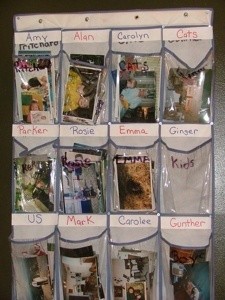
As I sat among the stacks of photographs I came up with the idea to take all my shoes out of my hanging shoe bag and use it to sort and store the pictures. It has worked super well and I could easily organize all my pictures and work on them when I wanted to with no stress.
By CPJ from Madison, AL
This page contains the following solutions.
When you get film developed or download your pictures to your computer, be sure to date them and state who is in the picture. Future children (great-great-grand children) may inherit them and then they'd know when the picture was taken and who is in it.
Many of us now have digital cameras and if you are like me, the pictures rarely go any farther than the computer. We tend to buy the biggest memory cards that hold sometimes 600 pictures.
I have thousands of pictures that I will never have time to sort through and dozens of old photo albums. Now, I make quarterly a picture book. It cost between $25-30 dollars.
With the computer age, many people now store their pictures on discs. But for those of us who still like standard photo albums, here's an idea.
If you're like me, you have loose photos all around your house; maybe in your wallet, between the pages of books, and most definitely shoved into drawers! This often happens, all those old family photos that have never been scanned into the computer or made it into photo albums - who has the time?

If you are overwhelmed with years of unorganized photos, start with the current ones first, and get them organized.
What if you inherit hundreds of photographs you can't keep? Let's say you set aside the family photographs and make a pile of the pretty pictures you like best.
I finally did it after all these years. I purchased a great Christmas Photo Album at a reduced price of $1.00. It has a holiday motif on the front and back and has 2 clear pockets on each page with a total of 100 pages.
While going through old family photos recently, and downsizing where I can. I decided to give photos I no longer wanted to my brother and sisters.
By registering, you receive a welcome kit including an instructional gallery guide, which offers tips for uploading photos to create your own albums, sharing your pictures online, creating fun photo products and more.
Here are the questions asked by community members. Read on to see the answers provided by the ThriftyFun community.
Help! I am putting 40 years worth of photos into albums! What a mess, and its so difficult to categorize them; according to ages and which grandchild age to put where, when they are all together w/family. I wish we could have afforded picture albums then! I've been doing this for 2 weeks and every room of my house is messy picture piles everywhere on every table.
I've organized pictures for my mom and for my husband when we got married. He also had about 40 years worth of pictures.
The best way, that I've found, is sort out all the pictures, first by size, square ones in one pile, rectangular ones in a pile, portraits (school, professional) in another pile. Then separate color from black and white. Then separate the curly edges from the straight edges, and block corners from rounded corners. Separate the pictures with a white border around them from the ones that don't have a border. By this time you will be able to tell which are the older pictures and which are the newer pictures. Also, note that many of the older pictures have the date printed in the border. Put the same dates together.
Once that is done, turn them all upside down and start separating by the code on the back of the picture. The newer ones might not have codes, but some will. Once they are separated by codes, then you have all the pictures from the same roll of film together and you know that those were taken around the same time, probably within a month of each other. Many of them are even numbered and dated so you can tell what order they are in. Do this with all the piles that you have. If you have any left over that don't have codes (and you will have culled the pictures quite a bit) then you can put the pictures together by backgrounds or same clothing that each person is wearing. Maybe someone took a picture of a little girl in the back yard in the morning and then again in the kitchen eating dinner. You know it was the same day because she's wearing the same clothes.
It is amazing how easy they are to put together and usually in fairly decent order using this system. You can generally tell an order by the age of the person in the picture.
I sorted my husband's pictures and did great, got them in albums in order, then his mother brought over a whole new box to go through. I had to try to insert them, in order, with the ones I'd already sorted. Then, believe it or not, his ex-wife brought over a bunch of hers and I had to do it all over again. But the system worked!
Hope this helps.
These are great ideas. I wanted to add that as the grown-up kid of a divorce and various remarriages by parents that excluding one parent may be taken as a hurt by the children involved. A child knows that he/she is the product of two parents and if one is excluded, then they child may wonder if something is wrong with them too. I would include all the photos where the children are present and also a few of just the couple.
I remember being comforted by seeing happy couple and wedding pictures of my parents as a child. It said that even if things didn't work out for them later, there was a time when my parents were happy together. If the new spouse is insecure, than I think making an album just for the kids is a great idea.
I cheated on this when I had to sort through several boxes of family pictures after grandma had a stroke. I scanned them all, sorting them into folders by family branch as I went, then burned a CD for the interested people. They can go get real "pictures" to make albums. I don't have the artistic skills.
I gave my son an album of pictures for his thirtieth birthday. Special ones I wanted I made copies of. It helped clean out the piles.
I have tons of photos to organize and I purchased many acid free boxes. I can't figure out what would be the best way to actually utilize them and make it easy to view the pictures. So far I have only separated them by each child's name, my husband and me and one for friends and family photos. My problem is how to then organize them within. Any advice?
You could attach ribbons to the top of each section with nice tags attached to the end . You could cover to boxes with contrasting fabric. Or buy a bunch of thrifty photo albums and cut out the pages to insert into your boxes.
Good luck!
Separating is half the battle! Personally I would sort by date now that the separating is done. Most of the photo boxes come with some kind of index card/separator, so use those to mark what event or date it is. If you run out, which I have, regular large index cards will work too.
The last tip I leave is to work on them in baby steps. A box a day or a pile a day. I tried doing it all in one day and got discouraged and they just sat there because I didn't want to deal with it, but when I went back and I did it in small amounts I had it done in no time. Good luck!
I've always planned to get around to putting my pictures in an album, but I haven't done so yet and I think I never will. I've kept my pictures in a big bag and just recently, I looked in the bag and found that dirt, dust, and gravel had gotten into the bag (there had been construction in the apartment). I must now go through each picture and dust it off so I figured it was a good time to organize my pictures.

Another interesting thing to do with photos is to make a collage and frame it. I have made several and framed them in beautiful gold frames. No-one has time to sit down with a photo album in my family and besides I think that the photos of my kids are the most beautiful art work that there is to be had. I cut out each picture individually and some of the collages have over 400 photos in them. Guests stand for hours looking at them.

I think first, decide how you want to keep them.
I use the plastic photo holder pages. They're safe, and it's easy to change around the photos and the pages, or add more. I keep mine in large 3 ring binders.
As for sorting, start by separating them into years, then into subsections like: just family, picnics, holidays, vacation, and so on.
After separating by year, decide if you want them to stay by just year or by "events". You can make as many different books as you want, 3 ring
binders can be bought at dollar stores, so the cost is kept at a minimum. You can start with the earliest and work up, one year after the next. Or
decide, one book, or section (use school subject dividers), for vacation photos, one for Christmases, weddings, other holidays, one for each child (and watch em grow), one for friends, and one for just family by the year.
This way, if you need to find a picture of someone, or something, (the couple we met on vacation in Florida), you know right where to look for it.
Good luck with your project.
By KayD
I have been given 6000 photos for work and now work wants me to organize them in numerical order and find some way to catalogue them. They also want some of the photos to be placed in frames and hung around in the office. All the photos are very sentimental. If any one has ideas that would be great, I have run out of everything.
By Rickii-lee from Queensland, Australia
This sounds like it will be a large project. Depending on what your business is willing to spend to help you get these photos organized etc. Here's some ideas: if work has a mail room, how about seeing if you can get a few of their mail sorters (these are usually made of wood but might be plastic), they have many slots which can be labeled and just as mail sorters would sort mail to go in them, you can do something similar; if that's not an option, then buy some under-the-bed shoe organizers and do it that way, if space is an issue, then use the vertical ones.
Although I don't have as many as you, I am doing something similar for my family photos I inherited, it works great by scannning through the photos so one knows what type of categories you'll need for the labels. It will also allow you to separate some and ask opinions of co workers if that's an option. As I post this, I almost wish I could be there to help, I love doing this type of work. *smile*
Does anyone have a good suggestion for cataloging photographs? I have boxes of them and would like to put them in some kind of order. Should they be chronological, by subject, etc.? Any ideas appreciated.
I like to do scrapbooks. A few years ago
I took a class in Utah and the teacher suggested that we sort our photos by occasion and then year. i.e. birthdays - 1998. Then sort by person and go from there. Even if you don't do scrapbooks, you could still put them in your photo album that way and I just use old envelopes and label what's inside.
I have so many photos in a one big box. What can I do to get them all organized?
Thank you.
By Debbie from Austin, TX
I put all my pictures in albums, for instance,with my brother, I put all his pictures on one page with all his family & etc. Hope this helps, good luck.
When I had this problem, I took envelopes and sorted them by approximate date. I had a pile from childhood, from the teenage years, college, before kids, etc. Then I can take each separate group and organize them better. I've been taking each group and doing scrapbooks, which is slow going but very nice when they are done.
There are also photo boxes with photo sized tabs to further help organize them.
Good luck!
I found photo boxes at my local dollar store. They come with dividers and you could sort by person in photos, by location, by year, by occasion, whatever you want. Or get a couple of multi-pocket expandable file folders with write-able tabs in the same place and do it that way.
I separated my photos by the person; all of the photos for my nephew in one pile, my niece in another, etc.
Then I started with them as infants and up till now. I put any photos that I was unsure of in the back of the album.
I made quick work of it and didn't make myself crazy by trying to remember where exactly the photos went; I guestimated, but I finished quickly, which was my goal.
It's funny because I did the same thing with my husband's children and showed it to them. They thought I made it for them and took them home!
But they loved having all their photos in one place and I think that's the thing.
Any photos of families I put in a separate album. Like photos of my sister, her ex, and their two children. went very quickly!
I did this a few years ago. First I sat down and looked at every picture and wrote on the back WHO was in the photo and if possible, where. So many old family pictures I have we are unsure who the person is. Then I seperated them by year to the best of my ability and put them is photo storage boxes I bought at a craft store for cheap. Good luck and grab the tissues because I cried after looking at all the pictures of my kids as babies and loved ones no longer with us. But I sure felt good when that project was done!