Home Improvement > Decorating > KitchenOctober 22, 2008

Decorating a Busy Kitchen

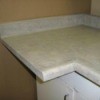
I need help with my kitchen. It is in a colonial style house and has 7 doors off it to various rooms. These doors all have white raised panel doors with white molding around them. Floors are a red oak hardwood, cabinets are the same red oak and appliances are black. The counter top is a robin's egg blue which is going to be replaced with either hardwood or a solid surface.

I have very little actual wall space to paint. There are also 3 windows, one above the kitchen sink and two in the breakfast nook on either side of the back door. My problem is that my kitchen seems so very busy with all the door openings and moldings. There is a lot to look at and many lines that break up the view.

I was thinking of painting what little wall space there is with a paint that matches the cabinetry as closely as possible, or one that is slightly off from the cabinet color in order to provide more visual unity. Then the black appliances and the white moldings and doors will provide the contrast rather than the walls. Problem is that I've never seen this done and wanted to get some ideas. I am really unhappy with this kitchen and wish I had the money to do a complete remodel but that isn't likely. Any ideas would be helpful! Thanks.

Deb from Rochester, NY

By

Answers

Read answers for this post below.

By Irene (Guest Post) 10/23/2008

Paint or refinish the doors to match the walls so they blend in with every thing else. I painted the raised panels on one of my doors with black chalk board paint. It will blend in with the appliances and can be used for a grocery list or other notes. When the grandkids come over, they love to write on the chalk board more than play with their video games. When they leave, just wash off their creations and you are back to plain blend in doors.

By
10/22/2008

You are right about minimizing contrast. Make that new countertop one color!

Related

Answer this Question

Your thoughts are welcomed and appreciated. Enter your answer here!

Answer:

Image Upload:

Add an image to your post! Click the "Browse" button above and select an image from your hard drive. Please only select gifs or jpegs. If you have any problems, please contact us.


facebook like arrowLike ThriftyFun on Facebook

Browse Topics

Over 80,000 tips, recipes, questions & crafts.

Ask a Question

Submit a question to the TF community.

Subscribe to ThriftyFun Newsletters!

Email: