Christmas > CardsDecember 12, 2007

Personalize Your Envelopes With Clipart

Personalize Your Envelopes

Personalize Your Envelopes

I personalize my Christmas card envelopes by inserting family or pet photos and dress up the envelope with Christmas clip art. I changed the page set up in my Microsoft Word program so the pictures, clipart, return address label and the "to" address appear in the appropriate spot on my envelope. I printed the envelopes in a few different steps. First I did the addresses. Then I re-feed the envelopes with my pictures and clipart. For the envelope, I change my page set up to the size of the envelope and paper set up to "landscape". I also personalize my letter with a few small inserted pictures. The pictures do not go where I want them to so I access the picture tool bar, pick "format picture"and pick "floating picture". I can then position the picture exactly where I'd like it.
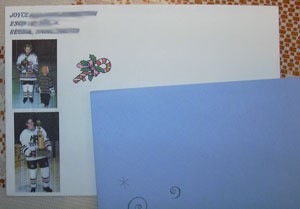
By Joyce from Regina, Sask.

By

Feedback

Read feedback for this post below.

By Pattie (Guest Post) 12/12/2007

How do you put the envelopes in your printer? I have no knowledge of this and would love some info. Thank you!

By Mary Wilson (Guest Post) 12/12/2007

That is such a kewl idea. Wish I knew how to do it with my computer. That would add a nice touch to my snail mail.

Related

Post Feedback

Your thoughts are welcomed and appreciated. Enter your feedback here!

Feedback:

Image Upload:

Add an image to your post! Click the "Browse" button above and select an image from your hard drive. Please only select gifs or jpegs. If you have any problems, please contact us.


facebook like arrowLike ThriftyFun on Facebook

Browse Topics

Over 80,000 tips, recipes, questions & crafts.

Ask a Question

Submit a question to the TF community.

Subscribe to ThriftyFun Newsletters!

Email: