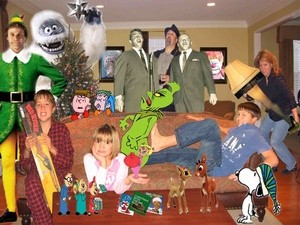
I got the idea from your site. I decided to add some of our favorite holiday shows to the picture.
By Teresa from Clarkston, MI
Add your voice! Click below to comment. ThriftyFun is powered by your wisdom!
How did you do that?
How did you do that and what program did you use? It looks great.
What a great picture! This would make a fun gift or Christmas card. I feel kind of ignorant, but, how did you add the characters to your photo. Thanks, and Happy 2009.
I too am wondering how in the world you did this? Is it something someone who isn't real computer savvy should even attempt? Thanks, Katie
I think the photo is adorable. But it is under the "craft" section and I can not find any directions on how to do it. Please help as I would love to make this photo this year. I know several other people would also LOVE the instructions. Please send instructions to:
jlroller (at) aol (dot) com Thanks and well wishes for you all!

Great photo and please do post the "how to".
First, I took a picture of my livingroom and then my family. I google pictures of the holiday character and copy and paste them into c:my pictures. Using the magic wand in Adobe Photoshop Element - I was able to cut the charaters and layer them into the picture. Youtube has many video on how to layer in photoshop. If you don't have Photoshop - Adobe has a free 30 day trail of the software. www.adobe.com/products/photoshopelwin
Add your voice! Click below to comment. ThriftyFun is powered by your wisdom!