Craft Projects > Paper > CardsMay 21, 2008

Craft Project: Apple Card and Tag

Apple Card and Tag

Apple Card and Tag

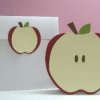
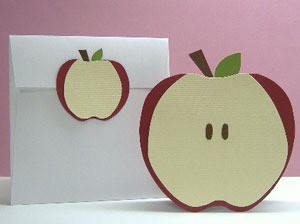
This folded apple note card with a match gift tag is made from cardstocks in natural red, ivory, brown and green. Ideal to send as a birthday greeting for children or simply to say hello to a friend. You might also like to make a batch of these for gift-giving.

Approximate Time: 30 minutes

Supplies:

  • 8.5 x 11 inch cardstocks in Red, Ivory, Brown and Green
  • Double-sided adhesive
  • White paper
  • Envelope
  • Pencil
  • Scissors

Instructions

  1. Fold the red cardstock into half. Trace the apple pattern. Cut out.
  2. Make tracings of leaf and stem. Cut out the leaf from green cardstock, and stem from brown cardstock using the scissors. Attach them with double-sided adhesive on top of card.
  3. Use the half-slice apple pattern to cut from ivory cardstock. Adhere.
  4. Draw seeds from brown cardstock. Cut out. Adhere centrally onto card.
  5. Use the small patterns and any excess cardstock to create a tag.
  6. Trace another apple-shaped from white paper. Cut it out and adhere inside of card for writing.

Click Here for the Apple Card Pattern.

Click Here for the Apple Half Slice Pattern.

By Maricel from Fairfax, VA
Feedback

Read feedback for this post below.

By Maricel (Guest Post) 08/01/2008

Save the Apple templates. Then open Word document, click 'insert picture' on top. Add the Apple templates. You can resize the pictures/templates.

By
06/01/2008

I really like the idea of the apple card and tag,but when I tried to print out the patterns they were huge. Any ideas on how to get the correct size would be helpful. Judy

By nana2oneboy (Guest Post) 05/22/2008

This is so cute. Anyone would love to get this card. It would be perfect for a get well or thinking of you note. Thanks for the great directions and for sharing this great idea.

Related

Post Feedback

Your thoughts are welcomed and appreciated. Enter your feedback here!

Feedback:

Image Upload:

Add an image to your post! Click the "Browse" button above and select an image from your hard drive. Please only select gifs or jpegs. If you have any problems, please contact us.


facebook like arrowLike ThriftyFun on Facebook

Browse Topics

Over 80,000 tips, recipes, questions & crafts.

Ask a Question

Submit a question to the TF community.

Subscribe to ThriftyFun Newsletters!

Email: