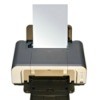
I have started using the draft mode on my home computer's printer, you can too, and this will save ink "in some programs." You can change your preferences and settings so you print in draft mode for all programs, and then you don't have to change it every time you print. On a PC, in Control Panel / Printers, right click on your printer and properties and change it there.
Add your voice! Click below to comment. ThriftyFun is powered by your wisdom!
Great Idea, I am going to try it. Staples gives you a $3 coupon for each empty ink cartridge you return. these can be put to the new ones.
Office Depot will either give you a free ream of paper or $3.00 off a new ink cartridge. They will only do that for one cartridge at a time though, so if both cartridges run out...take them back one at a time!
Add your voice! Click below to comment. ThriftyFun is powered by your wisdom!