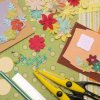
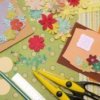
For custom scrapbooking paper line your scanner or copier bed with a sheet of clear plastic (to protect it). Next take anything you'd like to copy like shells, small stones, pasta, flowers, grass, cookies, candy, chocolate chips, crayons, sewing supplies, yarn, bubble wrap, lace, and even birdseed or dried pet food. Place it carefully on top of the plastic liner sheet then scan or copy it.
You will end up with some of the most amazing scrapbooking paper around! It looks totally real. Color usually works best, but some things (like lace) look wonderful in black and white.
By Cyinda from near Seattle
Add your voice! Click below to comment. ThriftyFun is powered by your wisdom!
I scan things all the time, but this one is the most innovative thing I have seen in a long time! Wow, bet me I will be doing that very soon.
You could lay some quilt or sweater material, beads, old jewelry, and so much more.
Thanks for the great idea!
PBP
You can also photocopy fabric! Light prints of course work best of course if you are going to print on it.
If the print you'd like to scan and print is too bright
to print on, try adding a sheet of thin white tissue
paper between it and the face of the scanner. Make
Hope this will help you.
Julia in Boca Raton, FL
This is just the coolest thing I've seen however I am not too much into scrapbooking but I could use this for other things. Copying and cutting out for decoupage...how exciting. Thank you
Add your voice! Click below to comment. ThriftyFun is powered by your wisdom!