ThriftyFun Logo
Home   Find   Ask   Share   Answer   Join   Index   Login  
 
 User Login:  Username:    Password:      Forgot It?  | Join ThriftyFun!

 - Beauty
 - Budget and Finance
 - Cleaning
 - Consumer Advice
 - Craft Projects
 - Craft Tips
 - Food Tips
 - Garage Sales
 - Gardening
 - Gifts
 - Green Living
 - Home Improvement
 - Organizing
 - Parenting
 - Parties
 - Pest Control
 - Pets
 - Product Reviews
 - Recipes
 - Repair
 - Weddings for Less

RSS Feed
About Us
Media
Advertising
Contact Us
Privacy Statement
Disclaimer

Use A Scanner To Make A Photo Collage

1x1
Date: 02/25/2008 Topics: Craft Tips > Photography | Photos > Crafts  
1x1
Post Feedback | Get Responses | Bookmark | Link | Print | Print (With Feedback) | Rate: Thumbs Up Thumbs Down | Bookmark and Share
Make Your Own Photo Collage
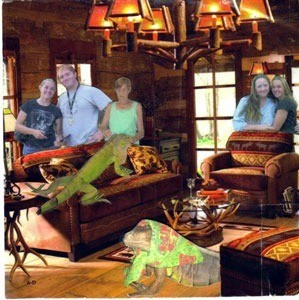
If you don't have the money for expensive Photoshop software but have a scanner and want to make funny photos with yourself and others in it, simply go through your photos and pick out poses of yourself and others that you like and then get backgrounds from magazines, catalogs or newspapers and crop your photos. Add yourself to the scene as I have done in my own photo. I used several family photos and product catalogs to make up this andIi made a mousepad out of this.

Good luck, we had fun!

By Igmommy from Sweetwater, TN
(1x1 graphic )
Previous: Craft: Easy Knit Glasses Case ThriftyFun Next: My Frugal Life: Invest In 401K And College Savings
(1x1 graphic )
1x1
1x1
 Feedback
1x1
1x1
1x1

By WildIrish (138) Profile Contact
tblaura's right...The GIMP is the way to go, if you want a Photoshop equivalent without the Photoshop price.

If you search online for "free graphics software", you'll find many other programs of this nature, as well.

Posted on 07/05/2008 | Report Spam or Abuse

By Lily 59 (155) Profile Contact
OMG!!!!!!!!!!!!!!!!! I cant wait to do that!!!!! that is SOOOOOOOO KOOOOOOOOOOOOOL!!!!! thank you! :)

Posted on 02/26/2008 | Report Spam or Abuse

By Igmommy (Guest Post)
I'm sorry I didn't tell you how in more depth, I made the mouse pad. I took an old place mat from my dining table, cropped it, adhered the photo I had made out of the catalog and personal pics, then topped it all with a sheet of clear adhesive sheet protector. It smoothed it out enough that my mouse rolls right over it without getting stuck. Doesn't it look real?

Posted on 02/26/2008 | Report Spam or Abuse

By tblaura (6) Profile Contact
For top-notch software for photos and are try a free software. It's called GIMP. Just put it in your broswer and you get it free. Also for photos use Picasa which is also free.

Posted on 02/25/2008 | Report Spam or Abuse

By lavonneann (157) Contact
Cute Idea. Thanks

Posted on 02/25/2008 | Report Spam or Abuse

By theseamstress (620) Contact
how did you make the mouse pad? after your photo was done?

Posted on 02/25/2008 | Report Spam or Abuse

1x1
1x1
 Post Feedback:
1x1
1x1
1x1

Login using the form on the top of the page to post feedback (if you are a registered user). If you have not yet registered, click here to do so. It's FREE!.

1x1
(1x1 graphic )

© 1997-2009 ThriftyFun.com - Design by Cumuli Design
Disclaimer: ThriftyFun.com cannot accept any responsibility for any injury or damage that you may cause to yourself, others, or property when following any advice given on this site. Read the full disclaimer. If you find any information on ThriftyFun.com or in our newsletters that is either erroneous and/or potentially harmful to others, please Contact Us, immediately.