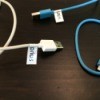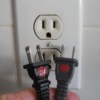
All of my AC adapters are black and all belong to different items. I purchased a white permanent marker and wrote on each one (i.e. cell phone). Then I used Velcro strips to secure the cords and store them all in a storage container that I got at a yard sale. They're on my list each time I go to get one. Big money saver. Now, I'm not guessing which goes to what, they're organized in one place and in a Thrifty container.
By keeper60 from NC
Add your voice! Click below to comment. ThriftyFun is powered by your wisdom!
This is an excellent idea. I have many AC adapters and such that will be taken care of now! Thanks so much for sharing this tip!
I use white liquid correction fluid (NOT water based type) to mark most things like VCR tapes, adapter cords, anything (especially) with a dark surface. Another great marker/identifier is RED nail polish.
Good thinking, not just complaining but actually coming up with a creative solution.
Where did you get a white permanent marker? I've never seen one and would love to have one as I'll be moving soon and will need to mark all my cords. Thanks for sharing and God bless you.
This is a great idea. Since I have never seen a white magic marker, I have been using thick paper key marking tags with strings attached to label my cords. I then keep my adapters in a large plastic container, but a shoe box would do nicely.
sorry for not replying sooner.I have several online craft stores I frequent.The white markers(3 diff.sizes)I think came from either factorydirect.com or sunshinecrafts.com. I'll try and check.There were 3,a fine,medium and bold.
I have a labeler as soon as I get a new toy I label it and keep all my adapters in a shoe box .
White-out works really well as a permanent marker-no need to buy another product. Also, a dot of nailpolish matching color to color works really well.
Add your voice! Click below to comment. ThriftyFun is powered by your wisdom!