I recently discovered some old family photos in my mother's cupboard. The photos are more than 50 years old, and all of them are coming from the era when black and white photos were still regarded as fashionable.
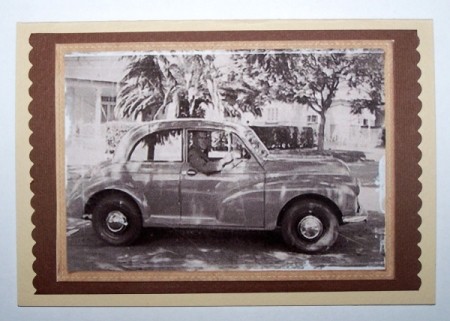
When I looked at these photos, I immediately thought of all the craft projects that these photos could be used for. I decided to use one of these photos to make a birthday card for my father. This card can also be adjusted for Father's Day, or any other occasion when you would like to make a card for a man.
*I used PhotoScape version 3.5, which can be downloaded free of charge from http://www.photoscape.org/.
Note: If you can't find a matching envelope, use a light tan sheet of paper and make your own envelope. You can find some templates for envelopes at: http://desktoppub.about.com/library/weekly/xenvtemp.htm.
Editor's Note: You will want to measure your photo choice and adjust card and envelop sizes accordingly.
By Benetta from Pretoria, Gauteng
Add your voice! Click below to comment. ThriftyFun is powered by your wisdom!
Just the other day I found a photo of my Dad holding me on a 1946 Ford.Although my Dad is no longer living this is a great idea for my scrape book. Thanks for the easy to follow directions and including the"photoscape"download.
Keeper North Carolina, USA
Really great idea and your card turned out beautifully.
The photo wouldn't necessarily have to be of a vintage automobile, but it might be of you and your Dad playing ball or him rocking you to sleep when you were a baby. Use whatever photo you have that will bring back sweet memories, and that lets him know that you remember too.
Pookarina
My Father was a photographer and he loved black and white photography and so do I! On my Facebook account I have an album of B&W pictures around the areas where I live and other places.
Yes, Shelyn, I absolutely agree, a certain charm has gone lost when we switched to color photography.
Add your voice! Click below to comment. ThriftyFun is powered by your wisdom!