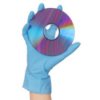
Does anybody have any safe ways to clean CDs?
Thomas from Ft. Collins, CO
Add your voice! Click below to answer. ThriftyFun is powered by your wisdom!
1. GENTLY wash CD with weak detergent, from edge to middle (NEVER CIRCULAR!) with soft kitchen or paper towel. 2. Dry from edge to middle with towel. 3. Here's the science bit --- Put a TINY spot of non-fluoride toothpaste (yes really!) on to towel and gently rub from edge to middle again. 4. Using a clean piece of towel buff in same direction.
The toothpaste helps to gently 'iron' out the scratches.
Da Da. A rejuvenated CD.
Also works well on 'skipping' tracks CD's.
Simple, cheap, effective and a little bit clever don't you think?
Margarete
For cleaning CD's spray a little Pledge furniture polish and wipe with a clean, dry, soft cloth. I saw this method at a CD store and have used it myself.
Manny
Best way - buy a CD cleaner at the store. Worst way - trying to clean the CD like you used to clean LPs.
Yes, I realize that actually having to spend $10-20 on a CD cleaning kit is not the "thrifty" way, but consider how much you've already invested in the CDs and the CD players. What's another few bucks? Trying to clean a CD using the same manner as you probably used to clean LPs will only damage the CD. In comparison, LPs were a lot more durable (to a degree).
Christine
i found that if you use a expensive aftershave on you cd's and just give them a light rub over the top it shines and plays much better!
If you smoke you can use the ashes from a cigarette or cigar to gently clean the cd. Ashes are one of the cleanest things in the world (the military teaches POW's to clean their teeth with them if no toothpaste is available), and by wiping from the inside to out in strokes you also fill in the scratches for better listening.
Add your voice! Click below to answer. ThriftyFun is powered by your wisdom!