 I just learned this one yesterday. Wish I had learned it long ago, as it would have saved me a lot of aggravation. I am assuming this is true for a lot of printers, so I am passing it on.
Being home schoolers, we use a lot of ink and paper. To save, I have Walgreen's refill my ink cartridges (for an HP 2210) when they run their specials of refills for $5, or I buy the used/refurbished ones at Office Depot or Walmart. Usually they work, sometimes they don't. Sometimes I will have one that I have used several times, and it will suddenly just stop for no reason.
This happened again this week. My nearest Walgreen or Office Depot is 30 minutes away, so its a real pain to go buy one and bring it home only to find it won't work. And, the two I got wouldn't work. I called HP to see if there was a work around as I didn't want to drive all the way back again. I mean we are talking 100 miles for 2 trips.
I was told to look at my cartridge for a date. There is evidently a microchip in the ink cartridge that tells the printer when that date has arrived. When that date gets here, it is considered to be an expired cartridge and will no longer work. The two ink cartridges I bought were indeed expired (sold to me by Office Depot in October and one had expired in April of 2007). That also explains why ones I have refilled over and over suddenly stop, the date came up.
So, I will no longer refill them close to or past the expiration date, and I will open the box and check the expiration date of refurbished ones at the cash register before I drive all the way back home.
I thought this was worth passing on!
Source: HP customer service rep
By mom-from-missouri from NW Missouri
This page contains the following solutions.
I just bought several new refurbished ink cartridges at the local office store and they would not work. So, I took them back.
This may apply to you if you have a computer with a printer. Specifically a printer that warns you or "shows" you it is low or even out of ink. You should test how long you can use you printer before you are actually out of ink. Don't trust the program telling you about it.
If you use your printer a little or a lot, ink is still expensive. I use my regular printer a lot, mostly black but it still "uses" color inks.
To save up to 30% on ink when printing, use the narrowest font possible. I never would have thought of this on my own.
Save money on printer ink. When printing, under Preferences choose "Draft." You will find the copy quite dark. It's surprising. It makes your printer ink go further.
Some of us have printer/fax machines that are costly. I know that after purchasing my Canon printer, I began to regret it because I felt that I couldn't afford it.
Here are the questions asked by community members. Read on to see the answers provided by the ThriftyFun community.
Tips and advice for saving money on ink cartridges for your printer. Post your ideas.

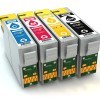
Ink cartridges can cost a fortune. They also do not last as long as they used to. I have come up with the frugalist way to refill and eventually earn free cartridges from Office Depot. Buy the better kits, and soak your clogged cartridges in the designated cleaning fluid, sometimes this will take a few days. Refill, wipe the inside area of the printer with cotton and cotton swabs with alcohol, save the printer cleaning fluid to unclog that cartridge to get it refill one more time.
By Shelley Wagner
I buy my ink from Sam's Club and refill my cartridges. I have a Canon printer, and each color is a separate tank, so this makes refilling pretty easy. At Sam's, a refill kit that costs $20 gives you 1 bottle of each color, cyan, magenta and yellow. Also, in case you have a printer that takes special photographic ink, there is 1 bottle of each, photo cyan and photo magenta. And 2 bottles of black. These bottles are 85 ML which appears to be about 3 ounces. They include a manual that lists all the different printers with detailed instructions on how to prepare and refill the cartridges. Also all the necessary equipment to work with, such as rubber stoppers to seal the cartridge back.
Make sure your home printer is on black and white default. The ink is less expensive than color.
By Rennae G
I have tried refilling different brands of cartridges with no luck at all. I found "Master Inkjets" to be inexpensive, $14.95 for color or black and white for many brands. They are very quick, guarantee their work and pay the postage! Just go to Masterinkjets.com they are great.
When the ink cartridge starts to fade, take it out and give it a little shake. You can get quite a few more pages out of it. Also, don't forget to choose "Fast Draft" for printing things that don't have to look excellent--shopping lists, for example.
Go to www.ims-ink.com to get an excellent refill kit that I bought at Cosco. It has the needle connected to the bottle so there isn't as much as a mess. It has 2 bottles of black and the three colors in photo and regular. They are all 80ml. A total of 640 ml of ink. A really good deal for those who fill up there ink and you don't have to have the store membership to get it.
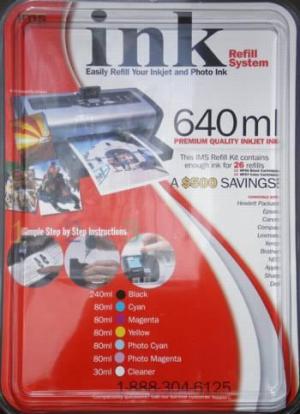
Local Costco no longer carries Ims-Ink refill kits. Last one I bought cost $20. The 240ml is 3 bottles of Black @ 80ml/bottle. I refill a Brother MFC3420C and have never had any difficulty with refills. I previously have refilled Epson and Lexmark ink-jets.
This Bother is my favorite. I use the copy and scanner frequently. Refill is the only way to go. It saves you a fortune.
Can the print head for the Canon Multipass 3000 be refilled? Can someone help me find a more reasonably priced one. They are so expensive. I don't think you can buy the print head separate from the tanks it comes as one unit PLEASE HELP! Thank you and I enjoy your newsletter. It's BCI-20, BCI-21, BJ. I have to pay $50 for them here in the Denver area.
I have two sources for you. I have a Canon BJC 4400 and it uses BCI-21 black ink cartridge. I have been refilling mine for almost 2 years now. You can buy the ink by the pint at www.oddparts.com and I have been using out of my pint of ink, as I said for almost 2 years now and have probably used 20% of my pint. They also have colored ink..Just check out their site. Last time I checked the black ink was still $20.00 a pint. My second source is for cartridges, and I think you should be able to replace just the cartridge without replacing the head...I can with my printer. Anyway, the cartridges are buy one get one free and the source is http://www.2for1inkjet.com They are very reasonable also but I can buy the BCI-21 cartridge at Office Depot for less than $10.00. The people at Oddparts are very friendly and helpful...I am sure they could answer questions on your specific printer. Harlean
I have been filling my Canon BC-02 and BC-05 cartridges for about 1-1/2 years ... quite a savings! I was eating up color cartridges like made, noticing in the Quill (mail order) office supply catalog that some other brands of cartridges could be filled, so called Canon direct and was told that my cartridges could be refilled by "me." Truthful manufacturer.
I found out that Repeat-O-Type is the company that mnufacturers for them and the distributor for them is INKSITE, which I have ordered through. You can check out the website WWW.inksite.com as well as call their toll free 1-877-465-7483 and talk to a real person that can answer all your questions.
Tip: If you are thinking about buying a new printer call the companies that sell ink refilling systems to see if they can be refilled. I found out that some printer manufacturer's are not real truthful; they will tell you no because they want you to buy new cartridges from them! Here again, do your homework. The companies who sell refill ink guarantee their product.
Remember if you don't look out for yourself, nobody else will! Good luck. Hope this info is of value to you.
Ms. Syd Barr
Dunkirk, MD
This is something I forgot to mention on my previous tip and Inksite will probably mention this if you call them. If you are buying in pint bottles, as I am, they recommend that you first purchase an initial refill kit with the various colors for your color cartridge. The reason, this has the small needle nose bottles for easy refilling and these small bottles can then be refilled from pint bottles.
Ms. Syd Barr
Dunkirk, MD
I've had great results from a company called The Ink Express. They sell refill kits with detailed instructions. And other printing items you might need. Great company to deal with!
BCI-20, BCI-21
i copied and searched in Google and found that you may buy cartridges for as low as $9.00 plus shipping.
Canon Multipass 3000
if you search in Google you will find that you can get cartridges at about $4.00
Some consumers like to save money on printer cartridges by refilling their own. If you have access to the ink then the process is usually quite simple. This is a page about refilling printer ink cartridges.
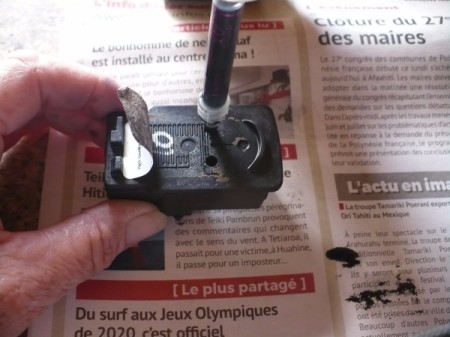
I don't print from my printer everyday therefore my ink seems to be drying up before I even have a chance to use it. Is there a way that I can preserve it or can I wrap it? I don't know I'm at a loss. I even had a printer and computer at home for a very long time and I'm feel like I'm new at this again. Thank you for any answer
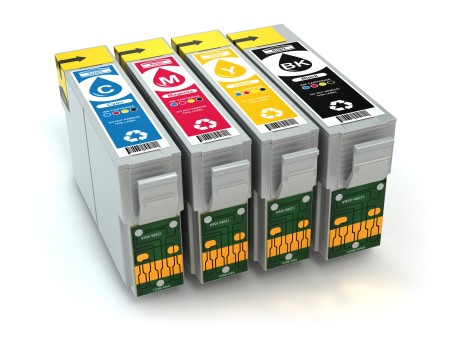
ThriftyFun is one of the longest running frugal living communities on the Internet. These are archives of older discussions.
Switch your printer font to Century Gothic. It uses less ink than other fonts.
Does your computer printer use a lot of ink? Mine does, even when I go in and change the printer to fast draft before printing and gray scale only.