 When you unplug your computer as you are revamping a room, or planning to use it in another room, here is a solution to tearing down and setting it back up.
I worked for computer companies and troubleshooting for the customers. Some were not as knowledgeable as others and so they would unplug everything and not know where the cables would go. My solution is to take cheap nail polish and before unplugging the wires color coat the cable and above the plug-in in back of computer with the same color. On the next cable use a different color.
This also is good for reminding you what end goes to computer and the one that goes to printer or fax machine by color coding. Also, if you live in your own home, use this on the plug that the phone system and computer share or fax. You will not have any more problems hooking your own computer up. I have helped several people, including workplaces, with this technique and they loved it!
By cj from Minot, ND
This page contains the following solutions.
I am by no means electronically gifted. And any time I have to unplug my computer, then plug it all back in again, I used to invariably have to holler for help!
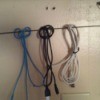
I always had cable cords draped over a door knob by my computer. It looked unsightly so I put a hook, large enough to hold my 4 cords, in the closet which houses my computer/desk.
I take single labels and fold them in half over the cord close to the end that goes into my device and label it.
Here are the questions asked by community members. Read on to see the answers provided by the ThriftyFun community.
How can I organize my computer wires?
Debbie from Manchester, NH
I COMPLETELY reinforce the pipe cleaners, since that is what we use. A couple other ideas - go buy the little hooks for attaching christmas lights up (usually sticky on one side - clear or white) for getting any wires off the floor that lead along the floor - they're practically unnoticable attached to your trim and then you can vacuum without cords in the way.
place them together and fasten them with a bread or baggie tie.
I love the hook idea! I'm buying some of those.
I use a long coiled telephone cord, I cut off the ends and just wrap it around the cords. I have wrapped my TV cords with one and wraped an artifical vine around that{it shows}
For identification, as soon as we purchase a new item that has a cord (printer, phone charger, etc.) I take a sticky label, write the item's name on it, and fold it onto the end of the cord near the plug. That way, you can look at the electrical strip and tell what the cord goes to.
I also label the electrical strip plugs: "Printer", "Monitor", "Phone", etc.
I use twisties or strong rubber bands to hold the excess cord.
I put those easily-taken-off hooks on the side of the actual computer tower and that's where we hang camera cords, iPod cords, etc. that don't always need to be plugged in somewhere but that need to be kept handy. Again, the excess is held together with a rubber band. (I use colorful rubber bands, b/c they look less "trailer park" than regular ones... and they make me feel happy and cheerful!)
I found a pretty good article on how to organize wires with using a combination of carabiners velcro straps and twisty ties. The nice thing about using carabiners and velcro straps is that they are easy to remove if your like me and constantly adding and removing wires.
I LOVE the phone cord idea! What a wonderful idea! I use the Velcro reusable ties for everything! For stuff that goes to the camera that I don't use often but need to know where they are. Hubby has a book case that I took over stocked flat box from post office (even a shoe box will work) and I used the lid to create 4 separate sections. Each section I put one cord; one for charger, one for usb and one for the actual camera, then one for the software. Then I slide it on a shelf with the box labeled on what it is. Works great for us.
Hugs and best of luck!
How do I hide black computer cords on a white desktop? I have them plugged in underneath the desk and hidden, but there are still lots of cords on the desk top plugged into my laptop that look messy. Any suggestions?
By Lois B.
Try straightening them out and have them run down under your desk and tape them under neath. You could also try doing that then putting something on top to hide them
Has anyone got an idea or solution for hiding wires from the computer, printer, phone, lamp, etc. at the computer desk?
By Army Brat from AL/GA Stateline/ Ft Benning, GA
How do I hide black computer cords on a white desktop? I have them plugged in underneath the desk and hidden, but there are still lots of cords on the desk top plugged into my laptop that look messy. Any suggestions?
By Lois B.
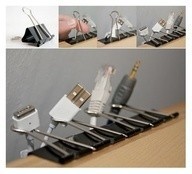
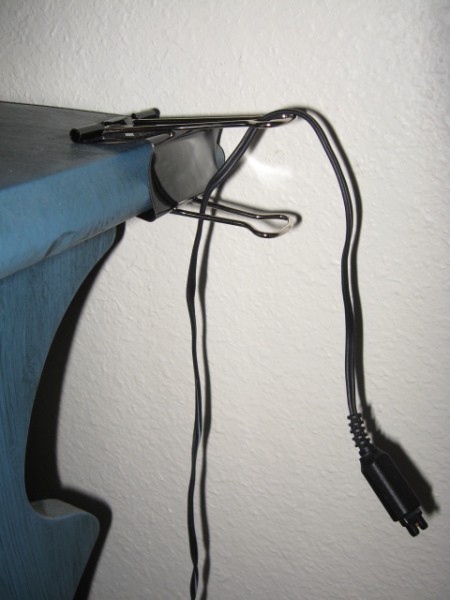
Binder clips are the perfect solution to keeping cords from falling behind furniture. They are also a great way to manage the mess of multiple cords.
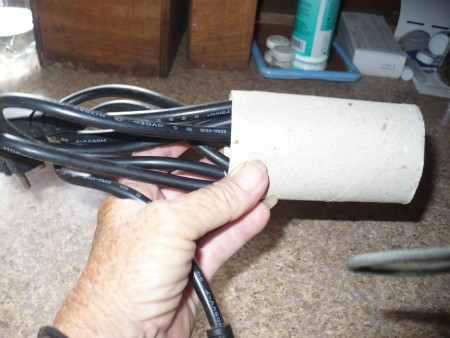
Laptop computer cables can create more clutter on your desk or other workspace. Also, when packed in a computer bag you want to make sure that they are rolled properly to prevent damage.
ThriftyFun is one of the longest running frugal living communities on the Internet. These are archives of older discussions.
When the time came to put my computer back and boot it up, I took masking tape and marked each cord that went into the tower.
We just got a new computer desk and I have a terrible mess of computer cords from the existing computer. It looks like an out of control octopus.