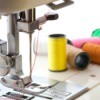
My sewing machine keeps jamming, down in the bobbin area. It won't sew even an inch. I look and see extra thread jammed down there by the bobbin, and have to yank it all out and start over, but it keeps jamming. How can I fix this?
Add your voice! Click below to answer. ThriftyFun is powered by your wisdom!
Two things come to mind.
First, check to be sure you have threaded the machine correctly. It's easy to do the threading process in the wrong order or wrong direction. Consult the manual to be sure.
Second, on my (admittedly old) Kenmore machine, I have to hold on to the ends of the threads when I first start to sew a seam. If I don't hold them (loosely), the top thread gets drawn down into the bobbin area and causes a huge mess. I only need to hold the threads for the first few stitches.
Good luck with this!
Patty
My 111W154 Singer jamed. Slide the right plate to the right. When it stops put a pin in the small lower right hole and push to unlock and slide the plate all the wayoff to the right. Clean the debris off the inside side of the plate. (Mine looked like sawdust) The machine was jamming because the thread could not get over the top of the bobbin easily.
Thank you so much! I kept trying to look for an awnser on why this kept happening an hour awnser help me a lot. Tysm!
1. Check for fuzz and use the brush to remove it
2. Make sure the thread take up lever (hook that goes up and down) is threaded. Mine did the same thing and somehow the thread got loose while sewing.
3. Oil the machine as per manual
4. New needle if the others don't help
Hope those help.
Sometimes machines need tune-ups, just like a car. But try this first: Take the bobbin out and try pulling on the thread. Does it come off the bobbin easily or seem really tight?
If it seems really tight, on the side of your bobbin, there should be a little tiny screw for which you have a screwdriver somewhere. In teeny tiny increments (like 1/8th of a turn at a time) loosen the screw, put it back in the machine, thread, and sew and see what happens. You may need to do it a couple of times, but only do litle, little, little turns.
If this does nothing, chances are the whole bobbin assembly is out of alignment and the machine needs to be serviced. I have my Bernina "tuned up" every two years.
I had the same problem last week with my Kenmore machine. It's fairly new and I haven't had any problems except what you're talking about. I was working on my prom dress last week and I couldn't sew more than a few inches. I was about ready to take the whole machine apart after a few hours (I love taking things apart anyway, but only three days before prom...), then I watched my needle (without thread) very closely and noticed that it was knocking on some of the interior metal.
I want to say thank you so much for all the veterans' comments posted to the thread. I'm a newbie and I've learned so much. Apparently my issue was my bobbin itself, I had the taller one in my machine and that's why it kept jamming.
Are you using a cheaper thread like wal-mart brand? I have to use jp coats which is sold at Wal-mart but a little more.Also check to see if your needle is good and not bent.
I feel your pain! I had a very troubled machine for years! A few tips:
-Yes, thread quality can be extremely important in certain machines. And absolutely check manual for how to thread machine.
-check the bobbin, some need a certain tension. Mine: hold the thread and bobbin should go slightly slower than gravity.
-do you own a pipe cleaner? Fold it in half and use a rounded end to clean out the fuzz. I get alot of fuzz from using polar fleece.
Where do I put the pipe cleaner? Where's the fuzz?
You are the only one so far that has actually explained how to adjust the Bobbin tension. Hold the Thread and shake the cage up and down is absolutely correct. The Thread shouldn't just pull off. It should drop slowly. Every other explanation used trial and error.
Check the tension settings on the machine as well as the needle. When needles get too old, they tend to have microscopic nicks in them that pull the threads. And if the tension is incorrect it will definitely cause the same problems you are having. I totally agree as well with the thread quality posting.
All the other advice is very, very good. Mine to add to it is, sew really, really slow on a scrap piece and watch what happens. And longer tails on your thread pushed to the back and held to start. Hand turn the wheel to put 2 stitches in the material before using the electric. Also make sure the foot feed is down to start.
Hi Thank you to everyone. It's still jamming. I'm going to try your tips. The thread is a good thread, but the bobbins are pre-wound from Joann fabric brand, I have no idea if that's bad quality or not. I was thinking it would be easier, to have them prewound. * Can I just sharpen the needle on an emery board ? *_____________________________________________
It only let me sew about two feet before all of this jamming started. It was doing fine before that, so I don't know what could have changed. : (
___________________________________________
Does anyone want to come talk where it's easier to post back and forth and answer each other ? It's free, click here. Save this link . It's a message board called "Home Sweet Home" Thanks !
forums.delphiforums.com/
.
I have a Kenmore top load bobbin. I watched very slow and careful because my thread would get all jammed up and Id have to pull to get it all out.
What I found was that my thread (from the top of the machine) would start to wind around the casing and saw it would not go all the way around like it should and then the thread would jam.
Sorry but I dont know a correction.
Make sure that you are using the proper size needle for the material...
When a sewing machine jams repeatedly even after picking out the thread ends, you probably need to lower the feed dogs and remove your bobbin case. Then, you'll need a flashlight and tweezers to look for the tiniest thread or dust bunny that may be causing the trouble. Canned air, used for cleaning electronic equipment, can also loosen dust or threads if everything else fails. After a good cleaning is a great time to oil your machine by following your manufacturer's instructions.
If you've checked for jams in the bobbin and shuttle cases and cleaned out thread ends and dust thoroughly but your machine still jams, unthread then rethread your machine's bobbin and upper threads. Many cases of jamming can be cured this way.
lol Okay thanks. If it's "out of time" does that mean the needle will hit the metal, instead of going down into the hole properly ? I think sometimes it's hitting the metal, and it keeps having a bunch of threads down there, somehow, every time I try it again. I yank them all out and start over, but it still does it. It starts out clean, ( no threads down there ) so it's doing it by itself when it's trying to sew. I can't even figure out how it does it. I tried watching it, with the door open, and I can't tell how it doubles up the thread like that.
What's strange is it worked fine the other day. It seems like it got messed up when I did "forward" then "Backward" at the end of the fabric. Then it's been acting weird ever since.
If you have the machine threaded correctly, here is one more thing to try. When you start the seam, hold both the top and bottom threads firmly off to the left, so the machine can't jerk them up. That's what solved my problem.
When this happened to me the tension was out of whack and adjustment. I actually had to pay a repairman to get it working again, but it was worth it to me since I couldn't fix it.
I feel so bad for you. I had a machine that did this until it drove me crazy. It was an older machine from Montogmery Wards and I found out later that it was a design flaw. There was a problem with the bottom bobbin and casing. I ended up getting a new machine and have never looked back. Every once in awhile I glance at it in the back of the closet and growl.
I have a Kenmore 385.1684180 - It was working fine until I transported on a trip. It will not move bound tight. Manual wheel will only move if the center is pulled out to fill a bobbin. Any ideas? Please help -- have more projects to finish. Thanks,
I know this thread is a bit old, but I just came across it because I am having the exact same problem. I have a NEW sewing machine. I threaded it like the manual said, everything was fine for a while, then It started jamming. I have rewound and restrung the bobbin multiple times and I have basically given up.
By the gods... I don't know which worked but here is what I did. First of all I was jamming underneath in bobbin area, no matter how many times I rethreaded it. I took advice all over the place... so I came here and did this in this order:
Dusted out bobbin area with air duster, bought a size 100/16 needle and put it in, set bobbin so it would fall at just below speed of gravity, adjusted top tension (the coin slot dial) to medium, set top number dial to 4, held threads to left side... jammed... adjusted top number dial to six and tried again starting out real slow on pedal... and now it works!
If that doesn't work for you when it worked for sad little male me trying for first time then I will pray for you to all the gods in all religions lol
I put this to music for my 7th graders:
listen for:
..."the tension dial's whack when the thread pulls in the back"
www.youtube.com/
I thank the person who suggested holding the two threads to the side.
It fixed the jamming :)
I'm new to sewing and was also having this same problem. It was so so frustrating. I was about to give-up when I came online and found this post. It was very helpful. Keeping the strings pulled to the left and re-threading seemed to fix it. I also cleaned the lint out of the bobbin area. Thank you for all the helpful tips. Happy Holidays XOXO
I have a brand new machine too, and it started jamming after I did the backwards sewing to finish off a corset. Since then it gathers a massive clump of the thread underneath the material and I've tried everything in this thread (excuse the pun). Any other suggestions?
Maybe somebody already said this...waaay too many posts to read...but when I've had this problem (always in the middle of a huge project like a quilt!) it's been because by bobbin carriage (shuttle?) is not in right. Something got it out of alignment and then it just wouldn't sew. I had to take the whole thing out and fit it back. Took some effort and trials but I've always managed to fix it.
First off get out your sewing machine manual.
Then:
Remove the needle & if its the same one that got jammed - throw it away.
Remove your bobbin.
Remove the thread from the machine.
**** Turn off the machine.****
Now.
Following the instruction manual, unscrew & remove the throat plate (needle plate) from the machine.
Using the brush supplied or a clean paintbrush, remove all the lint from the machine. You have a front loading bobbin in your machine so also clean out this area.
Using a bit of the suction from the vacuum cleaner wouldnt hurt either.
Make sure that all fabric & thread from the fabric jam is removed.
It is more than likely that your needle was blunt or broken & the needle has actually pushed the fabric etc into the hole in the throat plate.
Once all that is done then put the throat plate back in, rethread your machine & reinsert the bobbin following the directions in your manual.
If after all that you still have a problem I would take your machine to a repair place & get them to look at it.""
When my machine jammed and I tried moving the thread to the left, that didn't work. So I put a little 3 in 1 oil around the bobbin casing and ran a scrap piece of material to get rid of any excess oil and that did the trick.
When I had this problem is when I discovered that 2 clear plastic bobbins that look identical aren't. One is slightly taller than the other. So, you might want to check your bobbin number with the number your manual calls for.
Add your voice! Click below to answer. ThriftyFun is powered by your wisdom!